I’m a Flodesk affiliate partner, which means I may earn a commission if you sign up through my link, at no extra cost to you. I only recommend tools I actually use and trust in my own business.
This one’s a little different from what you usually find here.
Most of what I share is for couples and families looking for a photographer. Every so often something crosses my desk that’s worth passing along to anyone running a business. Whether that’s fellow photographers, small business owners, or just someone who’s curious about the tools I use to run mine. This is one of those posts.
You know the feeling. When you sit down to build a newsletter, open a blank template, and stare at it for hours before you’ve even picked a font. Then you resize an image, decide you hate the layout, undo it, try again. By the time it’s on-brand and ready to send, an afternoon is gone, and that’s an afternoon you didn’t actually have.
My own experience
As a wedding and family photographer, I’ve sent hundreds of newsletters. The booking dates email, the mini-session announcement, the bts recap, the sneak peek that goes out before the full gallery is ready. Every single one used to mean the same routine. Open a template, resize images, second-guess the layout, tweak it again, and somewhere in there lose an hour I didn’t have between edits and client calls. If you shoot weddings or family sessions, you know that hour. It’s the one that should’ve gone to culling galleries, prepping for tomorrow’s shoot, or actually being present with your own family, not fighting with a drag-and-drop builder that never quite matches your brand.
Flodesk Studio changes that math.
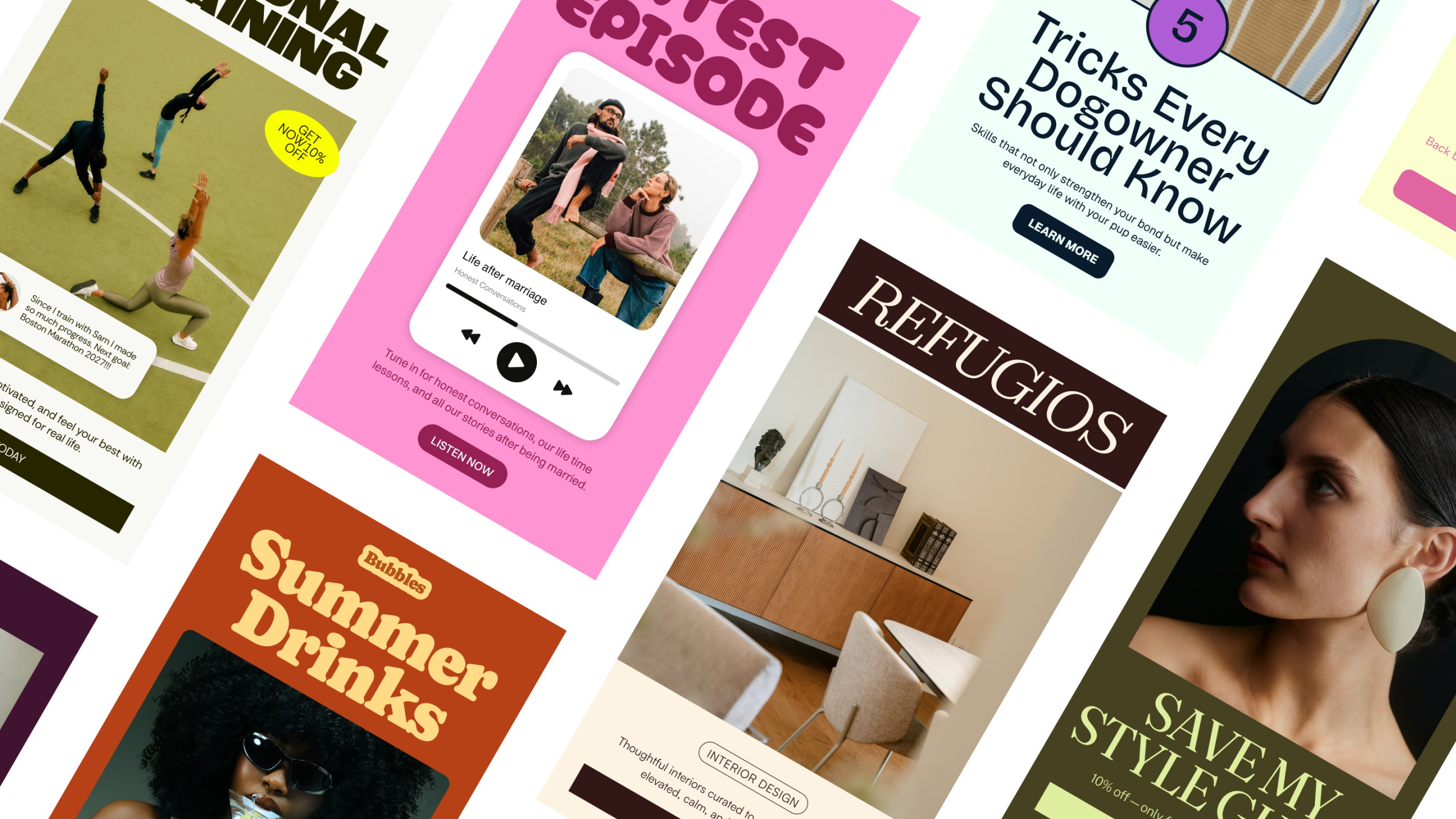
Studio is a new design space built for marketers and business owners who want their emails to look like a multimillion-dollar brand made them, without the multimillion-dollar production time. Start from a template, a prompt, or just an idea, tell Studio what you want, and in seconds it hands you three finished directions: a visual email, a banner email, and a plain-text email, each one already on-brand and ready to use. From there, it’s yours to shape: refine it in chat, drag and drop the pieces, or adjust every pixel by hand.
Real human design, accelerated by AI, finished by you
Here’s the important part: Studio doesn’t design for you. It designs with you.
It starts with human design. It’s accelerated, not generated, by AI. And it ends every time with you in full control of every pixel. The AI gets you roughly 80% of the way there so you’re never staring at a blank page, but nothing goes out the door until you’ve made it unmistakably yours. That distinction matters more than it might sound like it does. A lot of “AI design” tools hand you something generic and call it done. Studio is built the opposite way: it gives you a strong, on-brand starting point, and then gets out of your way so the finished email still looks and feels like it came from you, not from a template everyone else is using too.
If you don’t have a brand built out yet, Studio has pre-made brands to start from, so you’re never opening a truly blank canvas. If you already have a brand, Studio stores your detailed brand information, your colors, fonts, logo, and imagery, so everything you create stays pixel-perfect and consistent, send after send. You’re not re-uploading your logo or re-picking your color palette every time you sit down to write. Studio already knows what “on-brand” looks like for you.
From prompt to finished email in seconds
The prompt-to-create feature is where the time savings really show up. Tell Studio what the email is for, a mini-session announcement, a holiday card promo, a recap of last weekend’s wedding, and it generates three finished directions at once. You’re not choosing between three versions of the same idea; you’re seeing a visual-heavy layout, a clean banner-style layout, and a stripped-down plain-text option side by side, all already using your brand’s fonts, colors, and tone.
From there, you decide what happens next. Love one of the three as-is? Send it. Want to swap out an image or tighten the copy? Refine it in chat and Studio adjusts around your feedback. Want to get in and move things by hand? Drag, drop, resize, and rotate to your heart’s content. It’s the same email, three completely different ways to finish it, and none of them require you to build from scratch.
What’s inside the new manual builder
When you want to build by hand, the manual builder is fast and packed with block types built for real newsletter content, not just generic layouts. For a wedding or family photographer, this list reads less like a spec sheet and more like a shot list for your marketing: a testimonial block for that couple’s five-star review, a countdown block for your mini-session booking deadline, a recipe block if you’re sharing something personal between shoots, an invitation block for your next styled shoot or client event: Header, Banner, List, Testimonial, Countdown, Poll, Content, Invitation, Personal bio, Quote, Recipe, Signature, Social post (coming soon), Custom font (coming soon)
Add in drag-and-drop stickers you can move and rotate freely, fresh sticker and image shapes, and block-card styles like solid, grain, and blur, and you’ve got a design toolkit that feels more like a creative studio than a form to fill out. The grain and blur card styles especially are a nice touch if your brand leans editorial or film-inspired; they give your emails texture instead of the flat, corporate feel a lot of newsletter builders default to.
Built to work the way your brain does
Some days you want to type a prompt and let Studio hand you a starting point. Other days you want full manual control down to the pixel because you already know exactly what you want it to look like. Studio is built for both: edit the way your brain works, agentically or manually, and switch between the two whenever you need to, even within the same email.
It works best inside Flodesk, but it’s flexible enough to use with your ESP of choice too, so you’re not locked out if you’re on a different platform. And this is just the beginning: Studio is being built in public, with new features shipping often. Right now it’s focused on email, with forms, pages, and other marketing materials coming very soon, so the toolkit is only going to get deeper from here.
Why I keep recommending Flodesk
I’ve been sending my own newsletters through Flodesk since March 2020, and it’s the one piece of my business software stack I never think about switching. The platform itself is genuinely intuitive: clean templates, a builder that doesn’t fight you, and an inbox experience that actually looks like it was designed by someone who cares about design, not just deliverability. Six years in, I still haven’t run into a wall where I needed to go looking for a different email platform, which says a lot in an industry where most creatives churn through two or three tools before they find one that sticks. If you want to try it, here’s my link: flodesk.com/c/9K4X0A for a 25% off discount during your entire first year of Flodesk.
Studio is a separate platform from Flodesk, built by the same team, and it’s the newest addition to that toolkit. It’s not a new button buried inside your existing dashboard, it’s its own space, but it connects to your existing Flodesk account if you have one, or works with your ESP of choice if you don’t. And right now, it’s free in beta, so there’s no real reason not to open it up and see what it does with your next newsletter.
Some FAQs
Is Flodesk Studio free?
Yes! Studio is completely free while in beta. No upgrade fee or paid plan required.
How does Studio exist alongside the current Flodesk platform?
Studio is a separate platform and app, built on entirely new infrastructure so the team can innovate faster. It won’t disrupt anything about your current Flodesk experience, they’re learning alongside you. The features you love most may eventually make their way into Flodesk.com (or the two may merge down the road), and they’ll always keep you updated before changes are made.
Is this really AI, or just templates with my branding dropped in?
Neither, exactly. The design team hand-crafted thousands of individual component pieces, layouts, blocks, typography, palettes. The AI’s job is to assemble those human-designed pieces based on your prompt and apply your brand and voice. It’s expediting the process, not generating generic design. If it feels like a designer touched it, it’s because one did.
Is the AI trained on my data?
No. Studio is trained on the human design team’s work, not your Flodesk account or your subscriber data. Studio and Flodesk.com are separate platforms, and your data is never shared back to train AI models. Soon, you’ll be able to push your existing Flodesk brand settings (logo, colors, fonts) into Studio for seamless onboarding, fully in your control.
Can I edit an email after exporting it to Flodesk?
The builders work a little differently, so edits happen in Studio. Just reopen the email in Studio, make your changes, and export it again for sending.
Can I export to email platforms other than Flodesk?
Yes, you can export your emails in HTML format to any email service provider that supports HTML (Kit, beehiiv, Mailchimp, and more).
Can my brand profile hold more than one brand?
For this first iteration, it’s one brand per account, similar to the Flodesk.com experience. More flexibility is on the roadmap, so keep the feedback coming.
Is there a character limit on prompts?
Nope!
Can I save templates or revisit past emails?
Every email you create lives in your Emails tab, reopen, edit, and re-export anytime. Pre-designed templates are also coming to Studio soon.
Can I favorite blocks?
It’s visible in the builder but not functional yet, coming soon.
Can I move images around inside a block?
Yes! Depending on zoom, you can pan images in any direction.
How long will Studio be in beta?
What will it cost after? Beta will run for many months, they’re building this with you. Pricing isn’t decided yet; Studio is free while the team learns what you value most, and they’ll always honor their partners and members in any change.
Try it for yourself
Whether you’re designing your very first newsletter or your five hundredth, Studio is built to get you from idea to inbox in seconds, not hours. If you’ve been putting off your next send because you don’t have the time to design it from scratch, this is the tool that removes that excuse.
Start creating today: studio.flodesk.com